


Tasty
4.727.32K Reviews
App Specs
- Version
- 2.16.0
- Updated On
- License
- Free
- Downloads
- 10,000,000+
- Developer
- BuzzFeed
- Categories
- Food & Drink
- Platform
- Android, iOS
Screenshots
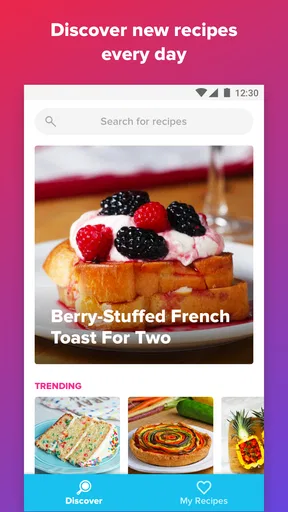
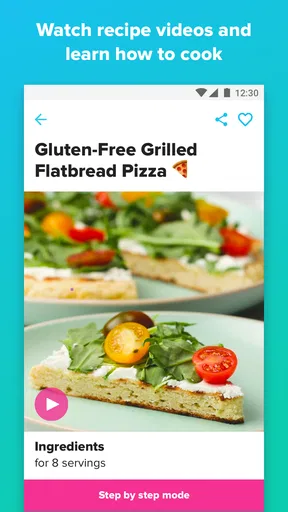
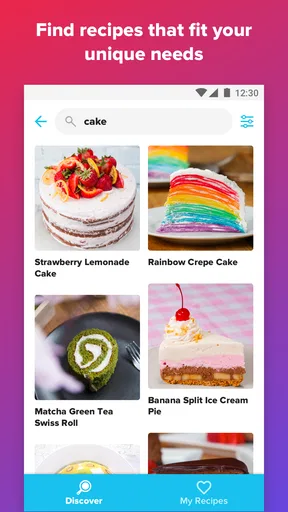

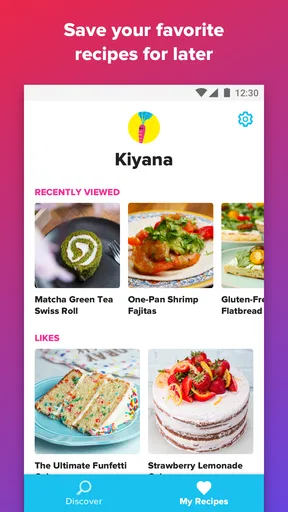
 Analysis by AppCompare
I tend to reach for a recipe app when I have ingredients but no plan, or when a familiar dinner needs a little change. Tasty is built around that kind of discovery: it brings short cooking videos and recipes together in a format that feels more like browsing for inspiration than consulting a formal cookbook. In my experience, that makes it inviting, especially if you learn best by watching a technique rather than trying to decode it from a paragraph.
It is a food and drink app from BuzzFeed, and its focus is clear from the first browse: recipes are presented to catch your eye and make the next step feel manageable. That approach is useful, but it also shapes the experience. I would treat it as a lively source of ideas and guidance, not as a substitute for careful planning when a meal has strict dietary, timing, or precision requirements.
Finding a recipe without getting lost
Readability matters in a cooking app because you may be glancing at your phone while doing something else. Tasty’s visual presentation makes recipes easy to scan, and the step-by-step format gives me a useful sense of what I am about to do before I commit. Search and browsing by ingredients or preferences can also help narrow the field when I have a particular need, rather than leaving me to scroll through recipes at random.
There is a trade-off to the bright, video-led design: it encourages browsing, and browsing can turn into a distraction when I only need a simple answer. I get better results by deciding what I am looking for first—say, a main ingredient or the kind of meal I have time for—then saving anything worth revisiting. The “My Recipes” area is helpful for that habit, since a recipe I liked does not have to disappear into a long feed.
Watching, reading, and following along
The videos are the app’s most distinctive help for beginners. Seeing how a mixture should look or how a step is carried out can explain more than a short instruction alone. I find that particularly valuable for unfamiliar techniques, where the difference between “stir until combined” and overworking something may not be obvious from text.
Video is not automatically the best format for every kitchen, though. If my hands are messy, the phone is awkwardly placed, or I need to move quickly between steps, pausing and replaying footage can interrupt the rhythm. I would preview a recipe before cooking and read through its instructions first, rather than assuming I can rely on the video in the moment. That small bit of preparation also makes it easier to notice whether a dish asks for equipment or ingredients I do not have.
Making the app work for different needs
Filters for dietary preferences can make browsing feel more relevant, and saved recipes can help someone build a personal collection instead of starting over each time. Still, I would check the full ingredient list and instructions for myself whenever an allergy, intolerance, or strict dietary rule is involved. A filter is a useful starting point, not a guarantee that every recipe suits a particular person or that ingredients can be substituted without changing the result.
Worth Reading Before You Choose

Baby Panda World Brings Quick Play to Modern Phones, but Its Game Library Feels Busy

ESPN’s Live Game View Makes Following Close Games Easier

QuizzLand Review: A Good Fit for Short Trivia Breaks, Not Every Player

Basketball Stars: Multiplayer Is Fast, but Can It Recover When Matches Go Wrong?

WEBTOON Turns Phone Updates Into a Better Reading Routine

Link to Windows Runs on Shared Habits, Not Social Feeds
For different abilities and settings, the mix of visual demonstrations and written steps offers more than one way to understand a recipe. That can be a real advantage for someone who finds a technique easier to watch, while the short visual format may be less comfortable for someone who needs larger text, reduced stimulation, or a completely hands-free experience. I would also consider the kitchen itself: a quiet place to watch a clip is different from a shared, noisy space where audio or a small screen may be inconvenient.
Where it fits in a real cooking routine
On a weeknight, I might open Tasty with a few vegetables and a protein left in the fridge, browse for a workable idea, then save the recipe and add needed ingredients to the shopping list. That list is practical because it reduces the chance of forgetting an item while shopping. I would still check quantities and group the list around the way I shop, rather than treating the app as a complete meal-planning system by itself.
Compared with a traditional recipe site, Tasty feels quicker to browse and more visual, but a text-first cookbook or recipe source may be better when I want detailed context, extensive notes, or precise control over every step. Compared with general video platforms, its recipe-focused presentation makes it easier to move from an appealing dish to instructions and saved recipes. The best choice depends on whether I want inspiration, depth, or a highly structured plan.
Getting to Know Tasty
Right off the bat, the Tasty app impresses with its user-friendly interface. It's like stepping into a digital cookbook that’s alive with vibrant images and easy navigation. If you’re someone who’s not exactly a pro in the kitchen, don’t worry. The app holds your hand through every step of the process with detailed instructions and helpful tips.
One of the things that caught my eye is the sheer variety of recipes available. From quick and easy meals to those elaborate weekend projects, there’s something for everyone. You can explore different cuisines, dietary preferences, or even search by ingredients you have on hand. It’s like a treasure trove of culinary inspiration waiting for you.
Features that Make Tasty a Must-Have
Let’s talk features. The app’s video guides are a lifesaver. Each recipe comes with a step-by-step video that visually walks you through the cooking process. It’s perfect for visual learners like me who need to see exactly how something is done before diving in.
Another standout feature is the “My Recipes” section. This allows you to save all your favorite recipes in one place. It’s super convenient for meal planning or when you’re just in the mood to revisit a dish you loved. Plus, you can customize the app to filter recipes based on dietary restrictions, which is a huge plus for those with specific dietary needs.
The Social Side of Tasty
Now, let’s not forget the social aspect. The app connects you with a community of food enthusiasts. You can share your cooking experiences, get feedback, and even swap tips with fellow home chefs. It’s like having a mini cooking club in your pocket.
One nifty feature is the ability to upload your own recipe photos and see how others have interpreted the same dish. It’s fascinating to see the creativity and variations that people come up with, and it often inspires me to tweak a recipe to better suit my tastes.
Cooking Made Simple
What really sets Tasty apart is how accessible it makes cooking. The app breaks down complex recipes into manageable steps, making it easy for anyone to follow along. Whether you’re a seasoned chef or a complete novice, the app empowers you to create delicious meals without feeling overwhelmed.
The app also offers a handy shopping list feature. As you browse through recipes, you can add ingredients directly to your shopping list, organized by category for easy navigation at the grocery store. It’s those little touches that make a big difference in the overall experience.
For a useful workflow, I would save a small group of recipes I genuinely expect to cook, then use the list to spot shared ingredients before heading out. That can make a few planned meals easier to organize than adding every tempting dish to a future queue. It also helps reveal a practical trade-off: a recipe may look simple in a clip, yet still involve more preparation or cleanup than suits a rushed evening.
The social features are best treated as inspiration rather than authoritative guidance. Seeing how other people present a dish can suggest serving ideas or variations, but their photos do not necessarily show whether a substitution will work or whether a method is safe for a particular kitchen need. I would use community posts to spark ideas, then rely on the recipe instructions and my own judgment for the actual cooking.
The app is free to install, with in-app purchases offered, so I can explore its core appeal before deciding whether anything paid is relevant to me. Its average rating is 4.7 from around 180,000 ratings, and it has passed 10 million installs. Those figures suggest broad interest, but they do not tell me whether a specific recipe suits my tastes; I still judge the app by how well its recipes fit my household and routine.
It is rated for Everyone, and version 2.14.0 supports operating systems starting at version 7.0. For someone deciding whether to try it, that makes the practical question less about being an experienced cook and more about whether a video-led recipe collection matches how they like to find and follow food ideas. The app was released on August 14, 2018, and BuzzFeed remains its developer.
When another approach is better
I would skip Tasty as my main cooking reference if I needed a tightly controlled meal plan, highly detailed technical explanations, or dependable adaptations for a medical diet. In those situations, a specialist source with carefully documented nutrition or allergy guidance is a better fit. I would also choose a straightforward written recipe when I need to scan several instructions quickly without watching a clip or navigating a visual feed.
It may also be less suited to cooks who prefer to improvise from a pantry list without choosing a particular recipe first. Ingredient search can help with discovery, but it does not remove the need to judge whether the suggested dish is realistic with what is on hand. I find it most useful when I am open to ideas and willing to check the details, not when I need the app to make every decision for me.
A few practical limits to keep in mind
Cooking beside a phone creates ordinary friction: the screen can be hard to consult with wet hands, and a video may compete with conversation or kitchen noise. I would set the device somewhere stable, review the recipe before starting, and use written instructions as a reference when replaying a clip is inconvenient. These are simple workarounds, but they matter more than the polished presentation once dinner is underway.
Accessibility is not one-size-fits-all. The visual steps can support people who benefit from demonstrations, while someone who has difficulty seeing a small screen or processing quick changes may need a different format or a larger display. Likewise, someone who cannot easily tap through a sequence may prefer a printed recipe or another hands-free setup. I appreciate that Tasty offers visual and written guidance, but I would not assume that combination removes every barrier.
If I were introducing it to a new cook, I would start with a recipe that has familiar ingredients and a manageable number of steps, then watch the video once before beginning. That reveals the pace and technique without adding pressure mid-recipe. For a more experienced cook, the strongest use may be finding a fresh direction for a familiar ingredient, rather than expecting every recipe to offer deep culinary explanation.
Cooking Made Simple
What really sets Tasty apart is how accessible it makes cooking. The app breaks down complex recipes into manageable steps, making it easy for anyone to follow along. Whether you’re a seasoned chef or a complete novice, the app empowers you to create delicious meals without feeling overwhelmed.
The app also offers a handy shopping list feature. As you browse through recipes, you can add ingredients directly to your shopping list, organized by category for easy navigation at the grocery store. It’s those little touches that make a big difference in the overall experience.
Ending Thoughts
So, here’s the deal: if you love cooking or even just eating delicious food, the Tasty app is absolutely worth checking out. It’s a colorful, engaging, and incredibly practical tool that makes cooking fun and approachable. Plus, it’s free, so there’s really nothing to lose!
Not only has it expanded my culinary repertoire, but it’s also made meal times a lot more enjoyable. Whether you’re looking for something quick to whip up on a busy weeknight or a show-stopping dinner party dish, Tasty has got you covered. So go ahead, download it, and let the cooking adventures begin!
My inclusive verdict
For me, Tasty works best as an inviting recipe companion: it helps turn a vague craving or a few ingredients into something I might actually cook, and its videos can make unfamiliar steps less intimidating. I would recommend it to curious home cooks who enjoy visual guidance and collecting ideas, especially when they are comfortable checking ingredients and adapting the plan to their own kitchen.
I would not make it my only resource for strict dietary requirements, detailed cooking instruction, or accessibility needs that call for specific controls or presentation. The clearest way to get value from it is to browse with a purpose, preview a recipe, save the ones that prove useful, and treat the list and community as helpful extras rather than guarantees. With those expectations, it is a friendly, practical option for making everyday cooking feel less repetitive.
Pros
- User-friendly interface for easy navigation.
- Extensive recipe collection.
- Step-by-step cooking videos.
- Personalized recipe recommendations.
- Offline access to saved recipes.
Cons
- Requires account for full features.
- Contains in-app advertisements.
- Limited dietary filters.
- No ingredient delivery integration.
- Occasional app performance issues.
FAQs for Tasty
What is Tasty and what does it offer?
Tasty is a popular cooking app that offers a wide variety of recipes, ranging from quick snacks to elaborate meals. It features step-by-step video guides, tips for meal prep, and a personalized recipe recommendation system. With Tasty, users can easily find inspiration for any meal occasion and customize recipes to suit dietary needs.
Is Tasty available for both Android and iOS devices?
Yes, Tasty is available for download on both Android and iOS platforms. Users can find the app on the Google Play Store for Android devices and the Apple App Store for iOS devices. This cross-platform availability ensures that a wide range of users can access its features and enjoy cooking with ease.
Does Tasty require an internet connection to use all features?
While Tasty does offer some offline functionality, such as accessing saved recipes, a stable internet connection is required to explore new recipes and watch video tutorials. The app's reliance on video content means that users will get the most out of the experience with an active internet connection.
Can Tasty accommodate specific dietary restrictions or preferences?
Yes, Tasty is designed to cater to a variety of dietary restrictions and preferences. Users can filter recipes based on dietary needs such as vegetarian, vegan, gluten-free, and more. This makes it easier for those with specific dietary requirements to find suitable and delicious recipes without hassle.
Are there any in-app purchases or subscription fees associated with Tasty?
Tasty is free to download and use, but it does offer in-app purchases for additional features, such as exclusive recipes and ad-free browsing. While basic functionality is available at no cost, these optional purchases can enhance the user experience for those looking to access premium content.


